
User Profile
Set up your Contact Information, Notification Rules, User Settings and manage Passwords
Your user profile is where you will configure important personal settings, such as contact information and notification rules to receive timely incident notifications.
To access your user profile:
- In the web app, hover over your User Icon in the top right corner.
- Select My Profile.
You can configure the following items in the user profile:
- Contact Information: Enter your contact information and basic account information so you can be notified about PagerDuty incidents in a timely fashion.
- Notification Rules: Set up rules to determine how and when you’re notified about PagerDuty incidents.
- User Settings: Configure login information and other account settings.
- Permissions & Teams: Information about which Teams you’re on and associated permissions (Only available with Advanced Permissions).
- On-Call Shifts: Review when you’ll be on call and create overrides.
- Subscriptions: Manage your business service subscriptions.
Contact Information
In the Contact Information tab of the user profile (User Icon My Profile Contact Information), you can add and edit basic contact information and personal details, as well as view recent account activity.
Required User Permissions
- All users can create, edit and delete their contact information.
- Admins and Global Admins can create, edit and delete contact information for all users, except the Account Owner. The Account Owner can create, edit and delete all users’ contact information.
Edit Personal Information
The following personal information fields can be edited:
- Name
- Title
- Bio
- Time Zone: Your time zone selection will be used to determine what time to display when reviewing schedules, incident logs and your on-call shifts.
To edit your personal information:
- Navigate to User Icon My Profile Contact Information tab.
- Click the icon to the right of the field, enter your information and then click Save.
Add a Contact Method
Add contact methods that you would like to be notified at when an incident is assigned to you. The following contact methods are available:
Recommended
We highly recommend that you:
- Set up multiple contact methods.
- Ensure that your notification sound settings are enabled.
This reduces the chance that you will miss an incident notification.
Add a Phone, SMS or Email Contact Method
To add phone, SMS and/or email contact methods:
- Navigate to User Icon My Profile Contact Information tab.
- Click the following links according to your preferences and follow instructions:
- Add Phone Number: Enter the phone number, select the phone number type (e.g., Work, Mobile, etc.) from the dropdown. If needed, you can configure a phone number with an extension.
- Add SMS Number: Enter the phone number, select the phone number type (e.g., Work, Mobile, etc.) from the dropdown.
- Add Email Address: Enter the email address, select the email type (e.g., Work, Home, etc.) from the dropdown. You may optionally select Send Short Emails if you would like short email notifications that are geared towards smaller devices like pagers or mobile phones. You may optionally select Send HTML Emails if you would like to receive HTML emails. If you leave both checkboxes unchecked, you will receive plain text emails. Please see our Notification Content and Behavior article for examples of HTML vs plain text emails.
- You can have up to 10 different contact methods.
- Click Save.
- To test that the connection between PagerDuty and your contact method is functioning, follow instructions in Test a Contact Method.
- Once you have added contact method(s), you must configure your Notification Rules, which determine how and when you will be notified about incidents.
Phone Contact Methods with an Extension or Delay
When configuring your phone notification methods, you may need to account for pauses, direct extensions, or key presses. You can achieve this by entering one or more commas (,), which each represent a one-second delay.
Tip
Depending on your phone system, you may need to add commas for pauses before AND after your direct extension.
- In the web app, go to User Icon My Profile Contact Information tab.
- In the section Phone, click to the right of the phone number you’d like to edit, or click Add Phone Number.
- Enter your phone number, followed by a comma (
,), then your extension. - Click Save.

Contact method with an extension
Examples
| Scenario | Contact method entry | Result |
|---|---|---|
| Phone notification method with a direct extension | 415-555-5555,1234 | PagerDuty will dial 415-555-5555, wait one second, then dial 1234. |
| Phone notification method with a direct extension (alternate) | 415-555-5555,,,1234 | PagerDuty will dial 415-555-5555, wait three seconds, then dial 1234. |
| Traverse a phone tree | 415-555-5555,,1,,,2,987 | PagerDuty will dial 415-555-5555, wait two seconds, dial 1, wait three seconds, dial 2, wait one second, then dial 987. |
| Leave a delay for "Please leave a message after the tone..." | 415-555-5555,,,,,, | PagerDuty will dial 415-555-5555, wait six seconds , then leave a message. |
Phone Number Formatting
PagerDuty uses a third-party provider to validate phone numbers. Phone numbers may not exceed 40 characters, and may only include digits from 0–9 and the following symbols: comma (,), asterisk (*), and pound (#).
Providers in some countries require us to format numbers in a specific way. Due to limitations with local providers, we require all Mexico-based SMS contact methods to be free of area code prefixes. For example, our system will automatically remove the leading 1 in the phone number +52 15558889999 and reformat it +52 5558889999. This improves deliverability and processing of SMS replies.
Additionally, we do not support trunk prefixes from the following countries and regions:
- France
- Romania
- UK
- Denmark
- Germany
- Australia
- Thailand
- India
- North America
You must remove trunk codes before adding a phone number as a contact method. For example, a UK-based number with local formatting 01332 412 251 must be formatted for international use without the leading 0, i.e., +44 1332 412251. Trunk codes or prefixes vary by region, and may be different from the example provided.
Add a Slack Contact Method
PagerDuty relies on a variety of third parties for notifications. We recommend that you always have a secondary contact method configured for backup to avoid delays due to availability, traffic or uptime. This ensures timely delivery of notifications when seconds matter.
For those customers using a free Slack account, there may be stricter rate limits on notifications that impact delivery.
Requirement
You must have a PagerDuty Slack integration configured with Workspace and user account mapping. View the Slack Integration Guide for more details.
To add a Slack contact method:
- Navigate to User Icon My Profile Contact Information tab.
- Click Add Slack workspace and select your Workspace from the dropdown.
- Click Save.
- To test that the connection between PagerDuty and your contact method is functioning, follow instructions in Test a Contact Method. You should receive a direct message from the PagerDuty Slack app confirming that you have successfully added Slack as a contact method.
- Once you have added your Slack contact method(s), you must configure your Notification Rules, which determine how and when you will be notified about incidents.
- Note: High-Urgency notification rules will automatically be configured. To make additional changes, please read Edit a Notification Rule or Delete a Notification Rule.
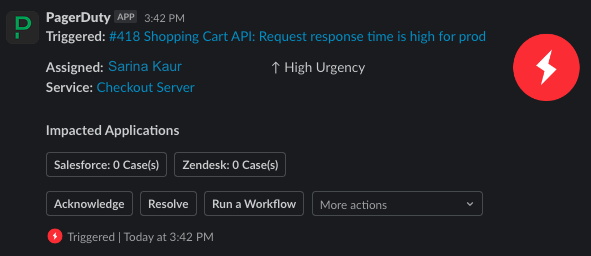
When you are assigned to an incident, you will receive an incident notification as a direct message from the PagerDuty Slack App. Please see our Slack User Guide for more information on how to respond to Slack incident notifications.
Test a Contact Method
You may wish to send a test notification to confirm that your contact method was added correctly.
To test a contact method:
- Navigate to User Icon My Profile Contact Information tab.
- Click Test to the far right of the contact method you’d like to test.
The above method of testing will establish a connection between PagerDuty and your contact method, but it will not generate a test incident. If you wish to test a contact method using a test incident to get the full experience, you may also:
- Trigger an incident on a service that uses an escalation policy you are currently on-call for.
- Add an Events API V2 integration to your service, which will provide a curl command to generate a test incident. For more information, please see our API Reference.
Edit a Contact Method
- Navigate to User Icon My Profile Contact Information tab.
- Click to the right of the contact method you’d like to change.
- Make the required changes and click Save.
Too Many Edits
You can edit contact methods up to 10 times within a 24-hour period. If you receive an error "Contact methods cannot be modified at this time," please wait 24 hours and try again
Delete a Contact Method
- Navigate to User Icon My Profile Contact Information tab.
- Click to the right of the contact method you’d like to delete. You will be prompted with a confirmation dialog.
- Click OK to accept the confirmation.
View Mobile App Devices
Under Mobile App on your user profile, you can view which devices are registered to receive push notifications. A device is registered to receive push notifications when you log in to the mobile app.
Expired Mobile Devices
An Expired flag next to a mobile device means that you have not logged into or accessed the mobile app in some time. For security's sake, our system expires the token. To re-enable the device, please remove the device as a contact method and log in to your PagerDuty account on the preferred device again.

Expired mobile device
View Recent User Activity
Below your contact information, you can view your activity for the past 14 days. This includes information about incidents that you acknowledged, resolved or manually triggered through the web application.
Notification Rules
Notification rules determine how you will be notified when an incident is assigned to you. This applies to both the frequency of when you’re notified, as well as which methods will be used (push, phone call, SMS, email, and/or Slack). You can configure different sets of rules for high and low-urgency incidents, as well as when incidents change.
User Permissions
- All users can create, edit and delete their own notification rules.
- Admins and Global Admins can create, edit and delete notification rules for all users except the Account Owner. The Account Owner can create, edit and delete notification rules of all users.
Requirement
You must first add contact methods to your user profile to configure notification rules.
The following types of notification rules are available:
- When someone invites me to respond to an incident: Notification rule for being added as a responder to an incident.
- When a high-urgency incident is assigned to me: Notification rules for high-urgency incident assignments.
- When a high-urgency incident assigned to me changes: Notification rules for assigned high-urgency incidents that are acknowledged, escalated or resolved.
- When a low-urgency incident is assigned to me: Notification rules for low-urgency incident assignments.
- When an incident I am subscribed to has a status update: Notification rules for status updates on incidents you are subscribed to.
- Before I go on-call or off-call: Notification rules to update you when you are about to go on or off-call.
Best Practice
We strongly recommend adding multiple channels for your notification rules. Push notifications have the highest reliability metrics of all delivery methods, so in the event that a 3rd-party SMS or voice carrier has an outage, having a push contact method means we will still be able to notify you.
When someone invites me to respond to an incident
When a user requests your help as a responder on an incident, PagerDuty sends
responder notifications using your high-urgency notification rules.
When you receive a responder notification, you’ll be prompted to accept or decline the request.
When a high-urgency incident is assigned to me
Create notification rules for high-urgency incident assignments.
- Navigate to User Icon My Profile Notification Rules tab.
- Under the section When a high-urgency incident is assigned to me... click Add Notification Rule.
- Enter the number of minutes PagerDuty should wait before sending the notification.
- The default is 0 minutes, which would notify you immediately.
- Select the contact method that you would like to be notified on.
- You can use the same contact method in multiple notification rules.
- Click Save.
Stagger Notification Rules
We recommend setting a short delay between your notification rules so that you are not notified at the same time on each contact method.
For example, in the image below this user has set up our recommended notification rules for high-urgency incidents:
- A push notification immediately (0 minutes) after assignment
- An SMS notification after 2 minutes
- A phone call notification after 3 minutes
- A Slack notification after 4 minutes
- An email notification after 5 minutes
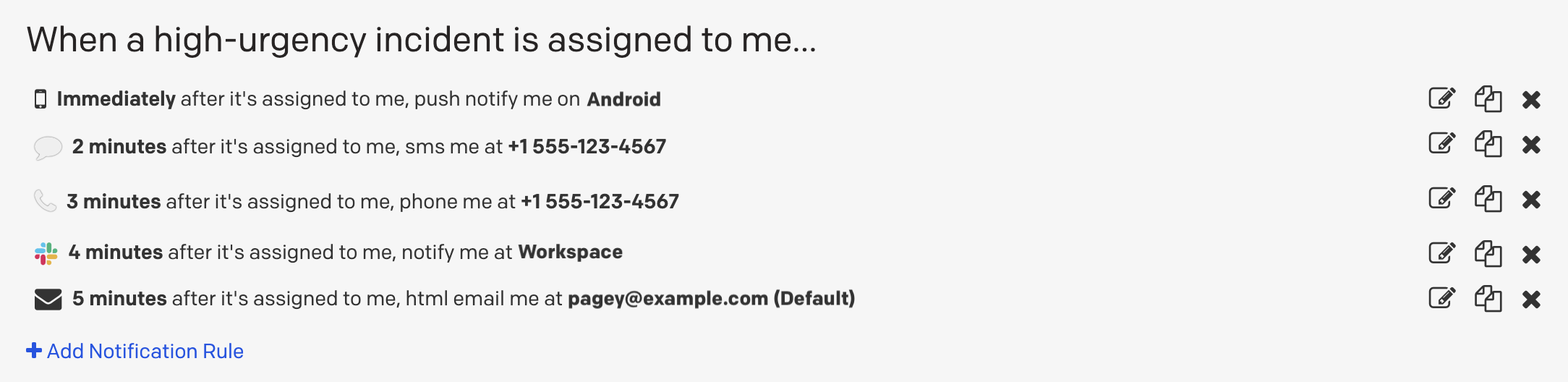
High-urgency notification rules staggered by 0, 2, 3, 4 and 5 minutes
When a high-urgency incident assigned to me changes
You can create notification rules so that you receive a message any time one of your high-urgency incidents changes status (i.e., acknowledged, resolved or escalated).
- In the web app, navigate to User Icon My Profile Notification Rules tab.
- Under the section When any of my high-urgency incidents change... click Add Notification Rule.
- In the first dropdown, select which incident state you’d like to be notified about:
- Available choices are acknowledged, resolved or escalated.
- In the second dropdown, select the contact method to notify.
- Click Save.
In order for PagerDuty to deliver a notification related to a status change on one of your incidents, you must have already received a standard high-urgency notification on that channel. As an example, if you configure notification rules to notify you after 1 minute, and your incident is acknowledged, resolved or escalated within that time frame (by another user or via the API, for example), you should not expect to receive a notification related to the status change.
Additionally, if you acknowledge or resolve your own incident, you will not receive a notification related to the status change, even if you have a rule configured.
When a low-urgency incident is assigned to me
- Navigate to User Icon My Profile Notification Rules tab.
- Under the section When a low-urgency incident is assigned to me... click Add Notification Rule.
- Enter the number of minutes PagerDuty should wait before sending the notification.
- The default is 0 minutes, which would notify you immediately.
- Select the contact method that you would like to be notified on.
- You can use the same contact method in multiple notification rules.
- Click Save.
When an incident I am subscribed to has a status update
Configure notification preferences for status updates when subscribed to an incident.
- In the web app, navigate to User Icon My Profile Notification Rules tab.
- Under the section When an incident I am subscribed to has a status update..., click Add Notification Rule.
- In the dropdown, select a contact method and click Save.
Feel free to repeat the steps above for other contact methods.
Multiple methods can be configured by repeating this step. If you would like to edit or remove a contact method, click the or the X to the right of the method.
On-Call Handoff Notifications
On-call handoff notifications (OCHONs) can notify you up to 48 hours before you go on-call, off-call, or both. These notifications can only be sent as an SMS, push notification, or email.
Requirements
To send OCHONs, the following three conditions must be met:
- You must have on-call handoff notifications configured in your User Profile (instructions below).
- You must be a target on an escalation policy.
- The escalation policy must have OCHONs turned on. If the escalation policy is attached to a service, the OCHONs will always be turned on. If it is not attached to a service, follow instructions to turn them on in our Escalation Policy Basics article.
To configure on-call handoff notifications:
- In the web app, navigate to User Icon My Profile Notification Rules tab.
- Under the section Before I go on-call or off-call..., click Add Notification Rule.
- Enter the following information:
- The number of hours before your shift that you would like to be notified.
- Whether you want to be notified before going on-call, off-call or both.
- The contact method to notify.
- Click Save.
Edit a Notification Rule
Edit any notification rule with these steps:
- In the web app, navigate to User Icon My Profile Notification Rules tab.
- Click to the right of the notification rule you’d like to change.
- Make the required changes and click Save.
Delete a Notification Rule
- In the web app, navigate to User Icon My Profile Notification Rules tab.
- Click to the right of the notification rule you’d like to delete.
- You’ll be prompted with a confirmation.
- Accept the confirmation.
Temporarily Disable Notifications
If you go on vacation or will be unavailable for a time we recommend creating an override for any schedule for which you are on-call. This ensures that there is coverage if an incident is assigned to you while you are not available to address the incident.
You can create overrides in the PagerDuty website, mobile app, or via our API.
If you want to make sure that you do not receive any PagerDuty notifications when you go on vacation or are unavailable to be on-call, you may also remove your notification rules.
Heads up
Removing notification rules does NOT mean that incidents cannot be assigned to you. Incidents can still be assigned and reassigned to you even if you do not have any notification rules as long as you are still on-call on a schedule or part of an escalation policy. By deleting your notification rules, you will simply avoid being notified of these incidents.
Also, note that removing your notification rules will NOT remove your contact methods. When you are ready to receive notifications again, you can go back to your profile page and re-add notification rules.
User Settings
In the User Settings tab of your user profile (User Icon My Profile User Settings), you can manage login information, view your user role, manage linked accounts and applications and configure other helpful settings.
Login Email
This is the email address you use to sign in to your PagerDuty account. It may be different from the email addresses you’ve added as contact methods.
Edit Your Login Email
- Navigate to User Icon My Profile User Settings tab.
- Click to the right of your Login Email.
- Update your login email address and enter your password.
- Click Save.

Edit login email
Password
This is the password you use to sign in to your PagerDuty account.
Change Your Password
If you know your password and can log in, you can change your password on your user profile.
- Navigate to User Icon My Profile User Settings tab.
- In the Password section, click Change password…
- Enter your current password, a new password and then confirm the new password.
- Passwords must be at least 10 characters long.
- Click Save.
Reset Your Password
If you forgot your password, you can reset it by sending yourself a password reset email. You must be logged out to reset your password.
-
Navigate to
https://app.pagerduty.comand click Forgot your password?. -
Enter your email address and click Reset Password.
SSO Login
If you use SSO to login, please contact your Account Owner to reset your password with your identity provider.
- You will receive an email containing a link to reset your password.
- Note: The password reset URL expires after two hours.
- Follow the on-screen instructions to reset your password.
Change Another User's Password
Users with an Account Owner or Admin user role can change another user's password:
- Navigate to People Users.
- Select the user whose password you want to change.
- Click the User Settings tab and select Change Password….
- Enter your password, and enter a new password for the user.
- Click Save.
In addition to changing the user’s password, this action will also revoke their OAuth tokens. This means that if they have any open PagerDuty sessions, they’ll be prompted to sign in to PagerDuty again with the new password.
Role
This is the user role associated with your user account. Only the Account Owner or an Admin user can change another user’s role. Read more about user roles.
Schedule Color
Each user has a color associated with their profile. This color is used on an on-call schedule to quickly recognize which periods they’re responsible for.
Edit Your Schedule Color
- Navigate to User Icon My Profile User Settings tab.
- Click to the right of your schedule color.
- Select a color from the dropdown and click Save.
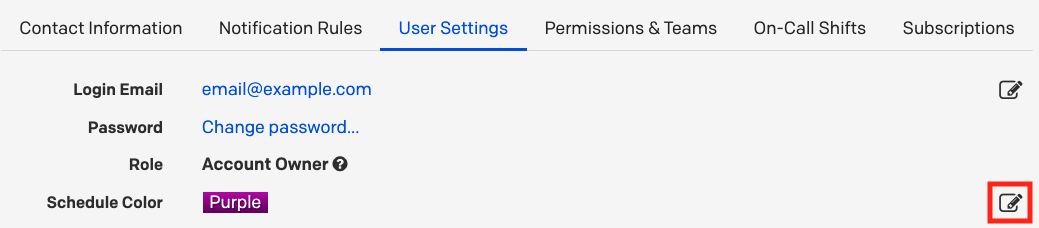
Edit schedule color
Calendar
Sync your on-call schedules to third-party calendar applications like Google Calendar, Apple Calendar, etc. You can export your schedule in either the WebCal or iCalendar format.
Read instructions on exporting your on-call schedules to your calendar application.
Photo
PagerDuty uses Gravatar to manage profile photos.
Linked Accounts
Third-party apps that you’ve integrated with PagerDuty, such as Slack, may appear here.
Unlink Accounts
You may wish to remove the connection between PagerDuty and a linked third-party account.
- Navigate to User Icon My Profile User Settings tab.
- Click Unlink to the right of the account you want to unlink.
- Click Unlink again in the modal to confirm your decision.

Unlink Slack account
API Access
The API Access section is the starting point for building your own OAuth-connected PagerDuty app.
You can also create a user-specific REST API key, which matches your user permissions:
- Navigate to User Icon My Profile Notification Rules tab.
- In the section API Access, click Create API User Token.
- In the modal, enter a Description and click Create Token.
- Record the API key in a secure place, since the key will not be visible again.
Delete a User API Key
- In the web app, navigate to User Icon My Profile User Settings tab.
- In the API Access section, click Remove next to the key you wish to delete.
- In the modal window that appears, confirm your decision.
Permissions & Teams
Advanced Permissions
The Permissions & Teams tab will only be available on accounts with Advanced Permissions.
On the Permissions & Teams tab, you can review your Base Role, as well as which Team(s) you are a part of.
Read more about administering this information in our Advanced Permissions and Teams articles.
On-Call Shifts
My On-Call Shifts offers a single, easy-to-use overview of their shifts across all escalation policies and schedules. This feature shows if a user is on call now, a list of their associated shifts and their schedule for the upcoming weeks and months.
Users can easily create override shifts across multiple schedules since all of the shifts are accessible in one place. My On-Call Shifts is also available as a widget on the right side of the Incidents page, displaying their current shift, and when they are on call next.
For more information, please refer to My On-Call Shifts.
Subscriptions
The Subscriptions tab is where you manage the business services you’re subscribed to. After subscribing to a business service, you’ll receive status updates when there’s an incident on a supporting technical service. Status update notifications are configured on your user profile’s Notification Rules tab.
For more information about subscribing to business services, please read Business Service Subscription.
Updated 26 days ago