
Event Management
Methods to reduce unwanted alert noise.
Event management reduces notification fatigue and helps your team focus on the right issues at the right time. The following methods are effective ways to prevent notification fatigue:
- Deduplicate Alerts: Services with Events API integrations deduplicate alerts with matching
dedup_keyvalues. - Event Orchestration: Automatically deduplicate or suppress alerts.
- Dynamic Notifications: Notify responders based on an alert's severity.
- Email Management Settings: Configure email integrations to trigger alerts only when the conditions you specify are met.
Deduplicate Alerts
For services with an Events API v2 integration, you can group related alerts into a single incident by including a dedup_key value in the trigger event's body. The dedup_key is a case-sensitive string that identifies an alert. Subsequent alerts with a matching dedup_key deduplicate into the same incident, and the new event is appended to the incident's Alerts log as an additional Trigger log entry.
If there are no open incidents with this key, PagerDuty creates a new incident. If two events with the same dedup_key are sent to two different integrations within the same service, they are not deduplicated and separate incidents trigger.
If the event key field is blank or absent, PagerDuty automatically creates a new incident with a unique key.
Refer to the Developer Documentation for more information on deduplicating incidents.
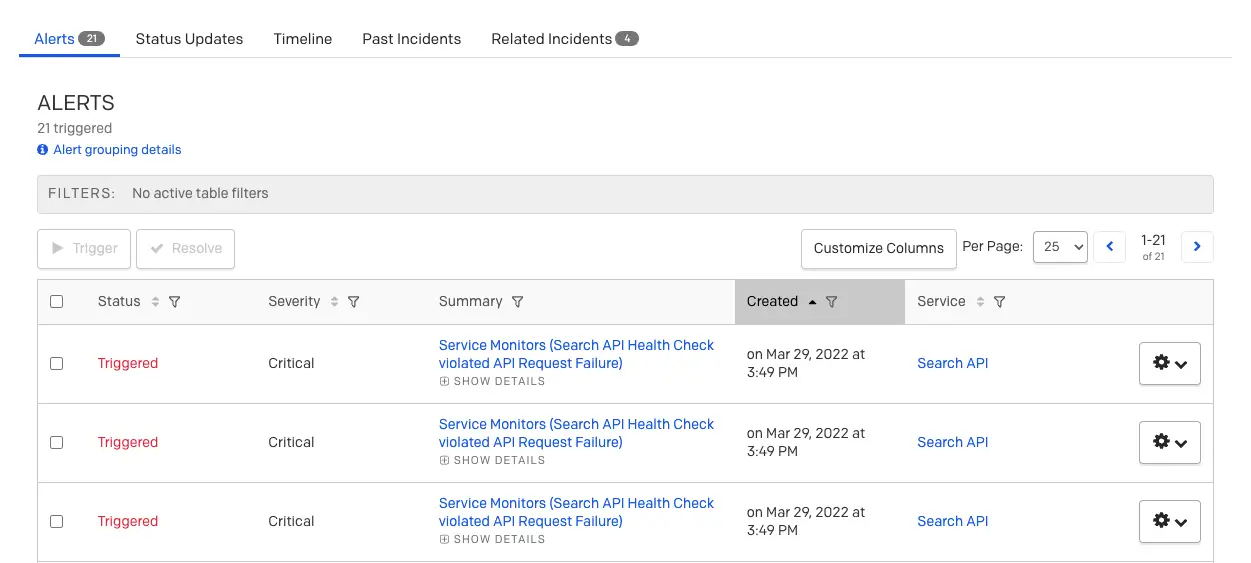
Alerts table
Events API v1The v1 version of the Events API also supports alert deduplication using the
incident_keyfield. Refer to the Events API v1 developer documentation for more information.
Event Orchestration
Event Orchestration allows you to define automated actions based on conditions that apply to the information in an inbound event's payload. Event Orchestration can perform actions such as deduplication and automatic alert suppression. Refer to Event Orchestration for more information.
Alert Suppression
AvailabilityAlert Suppression is available on accounts with AIOps, or Enterprise for Incident Management and Digital Operations (Legacy) pricing plans. Contact the Sales team to upgrade.
Alert suppression allows you to send events to PagerDuty without triggering any notifications. Suppressed alerts are stored in PagerDuty for forensics, analysis, and context, but do not create incidents. You can view suppressed alerts in the Alerts Table.
To suppress an alert when it matches a given set of conditions, select Suppress as the action when configuring an Event Orchestration rule.
View Suppressed Alerts
View suppressed alerts in the Alerts Table under Incidents Alerts.
Suppressed alerts are filtered out of the incidents dashboard by default, including the incidents page for the service where they were triggered. Because suppressed events do not trigger incidents, they are not visible in the mobile app.
The following is an example of a suppressed alert. It looks similar to other alerts, but has Triggered (Suppressed) in the Current Status field and is not assignable.
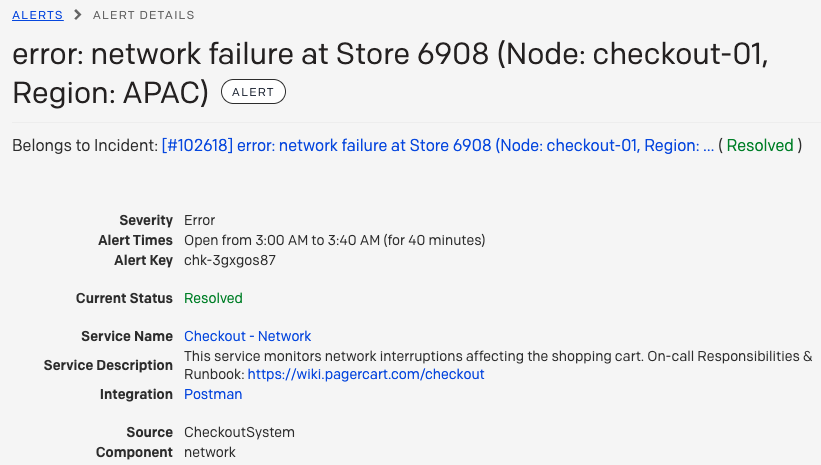
Alert details
Dynamic Notifications
Dynamic Notifications allow you to generate alerts with a severity field. When an incident is generated from an alert, the alert's severity field determines how responders are notified. Refer to Dynamic Notifications for more information.
Email Management Settings
If you use an email integration, you can adjust your incident creation settings to ensure incidents are triggered only when specified conditions are met.
The following incident creation settings allow for alert deduplication and reduce the number of notifications responders receive:
- Open a new alert for each new trigger email subject: Alerts are deduplicated based on trigger emails' subject line. If two emails with the same subject are sent to this service's email address, the first creates a new incident and the second is appended to it.
- Open a new alert only if an open incident does not already exist: An email sent to the service's email address creates a new incident only if the service has no open incidents. Otherwise, the email is appended to the open incident.
- Create and resolve alerts based on custom rules: Use regular expressions to parse incident triggers and resolves.
Refer to Email Management: Filters and Rules to configure these settings.
FAQ
What is the difference between deduplication and suppression?
- Deduplication: Alerts with the same incident key are grouped into the same incident and do not generate multiple notifications.
- Suppression: Alerts matching the conditions defined in your Event Orchestrations are suppressed and stored in PagerDuty for forensics, analysis, and context.
A key difference between suppressed and deduplicated alerts is that suppressed alerts do not create incidents. You can view suppressed alerts in the Alerts table. You can also deduplicate suppressed alerts.
Will suppressed alerts still show up on a service with no one on call?
If you send an event to a service with no on-call staff, the event does not create an incident. If the event is meant to be suppressed, it still goes to the service even if no one is on call.
Updated 4 months ago