
Service Performance Insights
The Service Performance Report offers a visualization of incident volume by service. It also includes a Services List with metrics including incident count, MTTA, acknowledgement rate, MTTR, response effort (incident duration), and escalation count.
To view the Service Performance report, navigate to Analytics Insights and select the Service Performance tab.
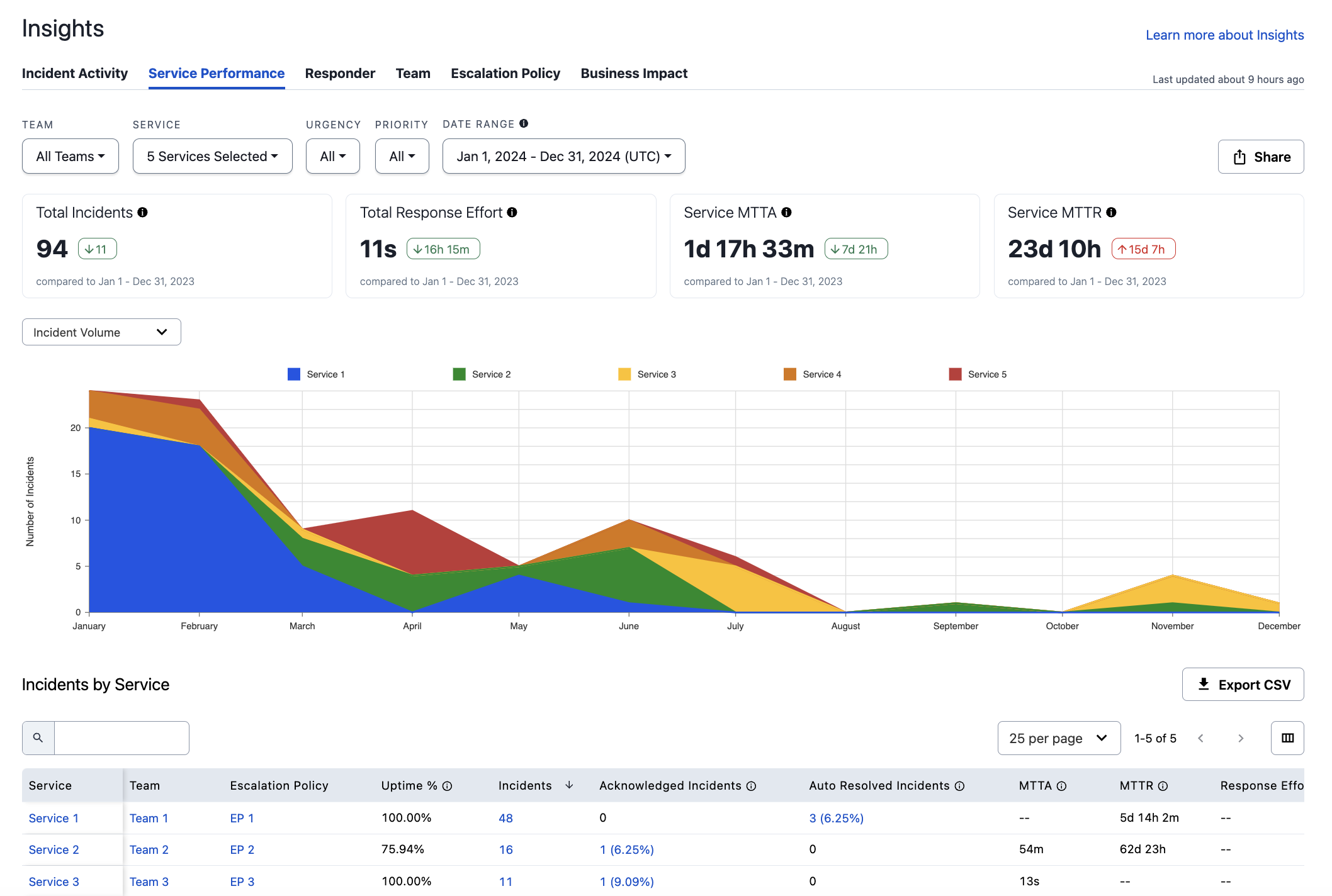
Service Performance report
Filter and Search Service Performance
TipYou can view up to ten services in the data visualization. If you select more than ten services, the extra services are collapsed into a single +n more line with a corresponding legend.
If a selected service does not have any incidents in the selected date range, it does not appear in the data visualization or in the Services List.
Filter Options and LimitsPlease see our Filter Reports section for more information on filtering options.
Each report has the following filter limits:
- Service, Responder, and Escalation Policy Filters: 1000
- Team Filter: 200
Please see our Filter Limits section for more information.
Summary Metric Cards
Each card includes a comparison time period. For example, if your selected time period is the last week, the cards show you the change in each metric compared to the week prior.
| Metric | Description |
|---|---|
| Total Incidents | Total count of incidents matching the provided filters. |
| Total Response Effort | Total time responders spent engaged in resolving incidents. Measured from the time a responder acknowledges or accepts a responder request until the incident is resolved. The user-defined incident duration, if it exists, is used for this calculation. Read Edit Incident Duration for more information. |
| Service MTTA | Mean time to acknowledge across services: the average amount of time from when an incident is created until the time the first responder acknowledges an incident. Excludes incidents that were not acknowledged. |
| Service MTTR | Mean time to resolve across services: the average amount of time from when an incident was created until it was resolved. Excludes incidents that have not been resolved. |
Data Visualizations
You can change the dropdown at the top left to select one of following visualizations:
| Visualization | Description |
|---|---|
| Incident Volume | Incident count by service. |
| Response Effort | Response effort in hours by service. The user-defined incident duration, if it exists, is used for this calculation. Read Edit Incident Duration for more information. |
| MTTA | Mean time to acknowledge in seconds by service. |
| MTTR | Mean time to resolve in hours by service. |
Services List
Below the data visualization you see the Services List data specific to the filters you have selected. You may perform the following actions with this table:
- Search: Use the search field to search for specific data.
- Sort: Click on a column header to sort results. You can also sort with multiple columns by holding down the shift key while clicking on both of the columns. The graph above does not change if you sort the data.
- Drill Down: Click a service, Team, or incident count in the Service, Team, or Incidents columns to view more information about each.
Service Display OrderServices with data that match the given filters and date range are shown, and they are sorted by the count of incidents each service has had. If a service does not have any data that matches the filters within the given date range, it does not appear in the Services List.
The available Services List columns are:
| Column Name | Description |
|---|---|
| Service | The service's name. |
| Team | The Team each service belongs to. Teams allow users to group and control user access to associated PagerDuty objects, such as escalation policies, users, schedules, and services. |
| Escalation Policy | The escalation policy name. |
| Uptime % | The percentage of time in the defined date range that the service was not interrupted by a major incident. |
| Incidents | The total count of incidents that occurred on the service within the specified time period. |
| Acknowledged Incidents | The percentage and the total number of incidents that were acknowledged on the service. Only explicit incident acknowledgments count; reassign, resolve, and escalation actions do not imply acknowledgement. Acknowledgements by added responders are excluded from this metric. |
| Auto Resolved Incidents | Total count of incidents that resolved automatically (i.e., not by a human). |
| MTTA | The average time for the first assigned user to acknowledge an incident. Reassign, resolve, and escalation actions do not imply acknowledgement. |
| MTTR | The average time from when an incident was created until it was resolved. |
| Response Effort | The total engaged time across all responders, measured from the time a responder acknowledges or accepts a responder request until the incident is resolved. Response Effort of resolved incidents can be edited on an incident's details page. Edited values are marked with an asterisk (*). |
| Total Escalations | The total number of escalations that occurred for these incidents. |
| Service ID | The service's ID (e.g., PXXXXXX). |
| MTTE | A measure of people's response time. This metric measures the time from the first user engagement (acknowledge or responder accept) to the last. This metric is only used for incidents with multiple responders; for incidents with one or no engaged users, this value is null. |
| MTTM | The time between start of an incident, and the last additional responder to acknowledge. For incidents with one or no engaged users, this value is null. |
| Average Assigned Responders | The average number of responders assigned to an incident. |
| Total Engaged Responders | The total number of responders engaged in an incident. |
| Timeout Escalated Incidents | Total count of timeout escalations that occurred for incidents on this service. |
| Manually Escalated Incidents | Total count of manual escalated incidents that occurred for incidents on this service. |
| Total Reassignments | The total count of incident reassignments from one responder to another across all incidents. |
| Reassigned Incidents | Total count of incidents that had at least one reassignment on this service. |
| Interruptions | Interruptions are when an on-call responder receives a mobile push, phone call, or SMS (text) notification. Notifications sent from various channels (push, phone, SMS) to the same destination are counted as one interruption. Notifications that arrive within 60 seconds of each other are counted as a single interruption. Email notifications are excluded from this metric. |
| Business Hour Interruptions | Interruptions that happened on weekdays between 8 a.m. and 6 p.m.* |
| Off Hour Interruptions | Interruptions that happened on weekdays between 6 p.m. and 10 p.m., or on a weekend between 8 a.m. and 10 p.m.* |
| Sleep Hour Interruptions | Interruptions that happened any day of the week between 9 p.m. and 8 a.m.* |
| Total Snoozed Seconds | Total seconds the incident was snoozed. |
* Times are given in the user's configured timezone. If they have not configured a time zone, the report uses the account's time zone.
By default, the Services List displays 10 results at a time. Use the dropdown below the table to select from 10, 20, 30, 40, or 50 results per page. If there are more results than the selected dropdown value, you can use the arrows (i.e., , , , ) to navigate through results.
Share the Service Performance Report
Read Share a Report for more information on sharing or exporting the report.
Updated 4 months ago