
Agent Tooling Configuration
Overview
SRE Agent can retrieve log data from observability platforms such as Grafana, Datadog, New Relic, AWS CloudWatch and runbooks from sources like Confluence and GitHub. By analyzing these logs and runbooks, SRE Agent guides responders through investigation, triage, and resolution—ultimately reducing MTTR and escalations.
SaaS IntegrationsAll of these integrations are SaaS-based.
Integrations - Documents/Runbooks
To allow SRE Agent to access documents in Confluence, GitHub, or ServiceNow ensure the necessary prerequisites are set up.
Confluence
- Set up the Workflow Integration and select Allow SRE Agent Access.
If you've set up your OAuth connection to Confluence but the integration isn't working, verify that your Admin has approved your user access to the PagerDuty App in Confluence.
- In your monitoring tool, update the event payload to include your Confluence runbook link in custom_details to include the following nested key:
"custom_details": {
       "runbook_url": {
            "confluence": "https://YOUR-RUNBOOK-LINK"
    }
GitHub
- Set up the Workflow Integration and select Allow SRE Agent Access.
Linked documents must already be committed to the main branch and cannot be from a feature branch.
- In your monitoring tool, update the event payload to include your GitHub runbook link in custom_details to include the following nested key:
"custom_details": {
       "runbook_url": {
            "github": "https://YOUR-RUNBOOK-LINK"
    }
ServiceNow
- Set up the Workflow Integration and select Allow SRE Agent Access.
Linked documents must already be committed to the main branch and cannot be from a feature branch.
- In your monitoring tool, update the event payload to include your GitHub runbook link in custom_details to include the following nested key:
"custom_details": {
       "runbook_url": {
            "servicenow": "https://YOUR-RUNBOOK-LINK"
    }
Set custom details with orchestration rules
You can use orchestration rules to update the event payload to include your runbook links in custom_details.
To update the event payload using event orchestration rules:
-
Go to an orchestration.
-
Go to the Edit Event Rule page Event Fields Add Event Field.
-
Click the Select Field dropdown and add a custom details path to the event field.
-
For Github:
runbook_url.github -
For Confluence:
runbook_url.confluence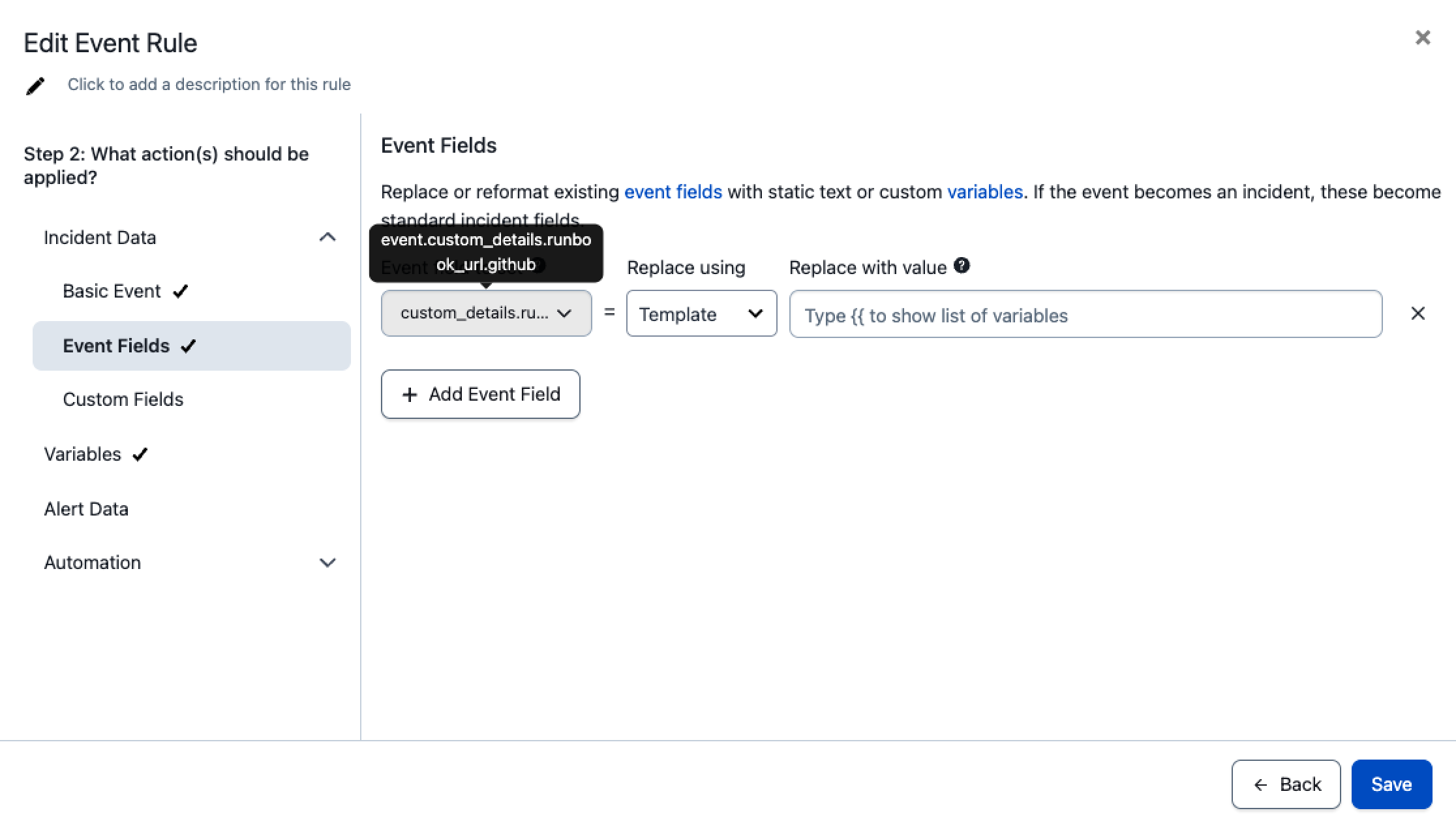
-
-
Under Replace using, select Template.
-
In Replace with value, paste the URL of the runbook in either github or confluence.
-
Click Save.
Integrations - Logs
Users can prompt SRE Agent to fetch and analyze logs, or use nudge buttons to do the same. Nudges appear only when the agent believes there’s enough information to execute a query. If asked to run a query without sufficient information, the agent will ask the user for more details.
Available Log Integrations
SRE Agent can fetch and analyze logs from the following services:
- Grafana
- Datadog
- New Relic
- AWS CloudWatch
- Splunk
- Dynatrace
- Elasticsearch
- Sumo Logic
Setup
To allow SRE Agent to fetch and analyze logs from one of these services, set up the Workflow Integration and select Allow SRE Agent Access.
Best Practices
- Log queries will work best if there are query examples in the runbook or alert payload (sample query in alert payload can be in any custom_detail field).
- Users can also directly provide queries to the agent to help ensure accurate log search.
Prompt Examples
- @pagerduty can you please fetch the logs for this incident?
- @pagerduty can you search the logs with this criteria [enter criteria]?
Updated about 8 hours ago