
Reopen Incidents
Reopen previously-resolved incidents
You can reopen an incident if an issue reoccurs or requires further action after resolution. Reopening an incident eliminates the need to create duplicate incidents when work resumes on previously-resolved issues. A reopened incident retains all incident context, notes, and history while enabling flexible assignment options.
ITSM Integration Support
| Integration | Support Status | Behavior |
|---|---|---|
| Jira Server | Supported (Configuration Needed) | Reopen is an event you can map to a Jira status. Configure the Reopen step to the corresponding Jira status field. Jira project workflows must allow a transition from Closed to Open or In Progress based on your integration status mapping. If this transition is not enabled, the Jira issue does not reopen when the PagerDuty incident is reopened. Refer to Jira: Allow issues to be reopened. |
| Jira Cloud | Partial | When you reopen an incident, the linked Jira work item moves to the status mapped to Triggered. All other mapped incident fields, including notes, priority, and subsequent status changes, continue to sync to the associated Jira tickets after reopening. Jira project workflows must allow a transition from Closed to Open or In Progress. If this transition is not enabled, the Jira issue does not reopen. Refer to Jira: Allow issues to be reopened. |
| ServiceNow | Not Yet Supported | This integration has the feature disabled by default within Account Settings. Linked ServiceNow incidents only reflect the earliest resolution date of the PagerDuty incident and the original assignee even after a reopen. Reopening a ServiceNow incident creates a new, linked PagerDuty incident. |
| ServiceNow CSM | Partial | Does not yet support reopening as an action from the ServiceNow CSM side. Incident status and other synced data continue to sync after reopening. |
| Salesforce | Partial | Does not yet support reopening as an action from the Salesforce side. Incident status correctly reflects within the Salesforce integration after a reopen. Syncing mapped fields continues to work after a reopen. |
| Zendesk | Partial | Does not yet support reopening as an action from the Zendesk side. Incident status correctly reflects within the Zendesk integration after a reopen. Syncing mapped fields continues to work after a reopen. |
Reopen an Incident
- Navigate to the desired incident in PagerDuty. You can locate a resolved incident in two ways:
- Navigate to Incidents All Incidents Resolved tab and use the available filters.
- Navigate to the service the incident belongs to and locate it in the Resolved Incidents list.
- From the incident's details page, click Reopen.
- In the modal that appears, under Assignee, select a user or escalation policy to assign the incident to. The Assign to dropdown defaults to the service's assigned escalation policy if you do not make a selection. When an incident is reassigned, it defaults to the most recently assigned escalation policy.
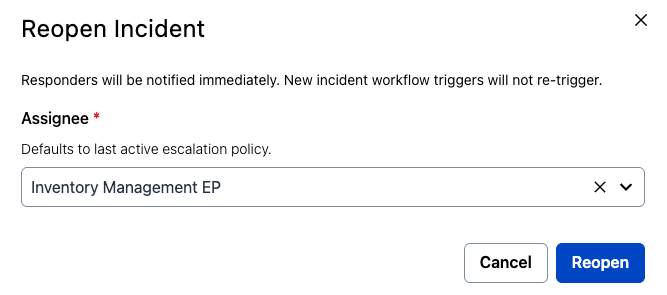
Select an assignee for the reopened incident
- Click Reopen to reopen and reassign the incident.
Once reopened, the following occurs:
- If you assigned the incident to yourself, the incident's status updates to Acknowledged. Otherwise, the status updates to Triggered and notifies the assigned users according to their notification rules.
- A Reopened label appears above the incident's title while the incident remains open.
- The incident timeline includes an entry stating the incident was reopened and assigned.
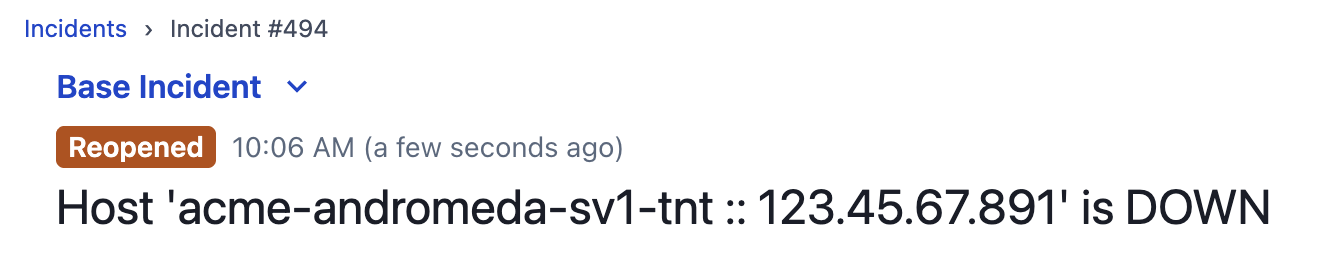
Reopened incident label above the incident title
Don't See the Reopen Button?Reopening incidents is controlled by an account setting. If the Reopen button does not appear on a resolved incident, an administrator may need to enable it under User Icon Account Settings Incident Settings Reopen Incidents. See Manage Reopen Incidents Settings for details.
Manage Reopen Incidents Settings
You can manage account-wide access to the Reopen Incidents feature in your account settings.
Required User PermissionsResponder, Manager, Global Admin, and Account Owner roles can manage access to the Reopen Incidents feature.
- Navigate to User Icon Account Settings Incident Settings.
- Under Reopen Incidents, toggle Allow reopening incidents on or off.
Updated 2 months ago