
Round Robin Scheduling
Use an assignment ring to add responders to incidents in sequential order
Round Robin Scheduling is an incident assignment strategy where users are placed in a ring and assigned to incidents sequentially. This strategy helps ensure that incidents are equitably distributed, especially if they cluster during a single on-call shift. It can also lower incident response time if a service experiences concurrent incidents, since the incidents will not all be assigned to the same responder.
AvailabilityRound Robin Scheduling is available on the following pricing plans: Business, Digital Operations (legacy), and Enterprise for Incident Management. Contact us for more information about changing to a pricing plan that includes Round Robin Scheduling.
Enable Round Robin Scheduling
Enable Round Robin on a New Escalation Policy
Follow the instructions to create an escalation policy, making sure to select Assign via Round Robin in step three.
Enable Round Robin on an Existing Escalation Policy
- Navigate to People Escalation Policies click to the right of your desired escalation policy and select Edit. In the level(s) where you would like to enable Round Robin, check the box Assign via Round Robin.
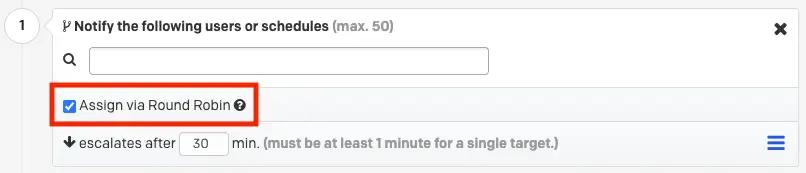
Select Assign via Round Robin
- Add users or schedules to the escalation level. When it is a schedule's turn for incident assignment, whoever is currently on call for the schedule will be assigned to the incident.
- Click Save.
When an incident triggers on any service that uses this escalation policy, incidents will be assigned in sequential order to the users and/or schedules participating in the round robin rotation.
Round Robin Scheduling Indicator
With Round Robin Scheduling enabled, a green arrow appears next to the user who is next in line for incident assignment.

User1 Is Up Next for Incident Assignment
Disable Round Robin Scheduling
- Navigate to People Escalation Policies click to the right of your desired escalation policy and select Edit.
- Uncheck the Assign via Round Robin checkbox underneath each escalation level where you would like to disable Round Robin Scheduling.
- Click Save.
Starting Point Determination
Round Robin Scheduling uses an assignment ring to determine who to assign an incident to. The starting point of the ring is determined by the user order when the escalation policy is created. For example, if you enable Round Robin Scheduling on an escalation policy and add User 1 followed by User 2, the starting point of the ring will be User 1.
When Users Are Added or Removed
When you add or remove users or schedules from an escalation level with Round Robin Scheduling enabled, the previous on-call sequence for other users and schedules will remain unchanged. This means that:
- Any users or schedules removed from the escalation policy level are also removed from the assignment ring.
- Any users or schedules added to the escalation policy level are appended to the back of the ring, in the order they were added.
- The ring resumes in the same order it was originally configured in, either without the removed user or with the newly-added user at the back of the ring.
Examples
Add a User:
A round robin rotation has two users, and User 2 is set to receive the next incident:

If you add User 3 and User 4, they are added at the back of the assignment ring. The assignment order continues after User 2 onto User 3 User 4 User 1, and so on:

Remove a User:
With the same four users as above, User 3 is set to receive the next incident, but you remove User 4:

The order continues after User 3 onto User 1 User 2, and so on:

Responder Requests
When an escalation policy with Round Robin Scheduling is requested as part of a responder request — either manually or as part of an Incident Workflow — the request goes to the user at the front of the assignment ring and the ring rotates.
Example: An escalation policy with Round Robin Scheduling has three users and User 2 is at the front of the assignment ring. During the course of an incident on a different service, someone requests the escalation policy as a responder. User 2 receives the responder request and User 3 is now at the front of the assignment ring.
Incident Workflows
If a Round Robin Scheduling escalation policy is part of an Incident Workflow's responder request along with other users, all users indicated in the workflow will receive responder notifications and the assignment ring will rotate.
Schedules With Coverage Gaps
When a schedule is due for assignment next, PagerDuty attempts to assign the incident to whoever is currently on call on that schedule. If no one is on call due to a coverage gap, PagerDuty skips the schedule and assigns the incident to the next user or schedule in the assignment ring. This ensures that a coverage gap on a schedule does not cause an incident to be missed.
When a skip due to a coverage gap occurs, the schedule remains at the front of the assignment ring, and PagerDuty will attempt to assign the next incident to it.
Escalation Timeouts
If a responder does not acknowledge the incident within the escalation timeout period, the incident escalates to the next level of the escalation policy — it does not rotate between users or schedules at the same escalation level. To learn more about escalation policies and escalation timeouts, see Escalation Policies.
Escalation Policies with a Single Level
If a responder does not acknowledge an incident within the escalation timeout period and the escalation policy is set to repeat, Round Robin Scheduling will attempt to assign the incident to the next user or schedule in the assignment ring.
When an incident is reassigned to the same escalation policy, Round Robin Scheduling will also assign the incident to the next user or schedule in the assignment ring.
Round Robin Scheduling and Live Call Routing
Round Robin Scheduling does not apply to Live Call Routing when the connection is configured to connect directly to an on-call responder. Live Call Routing will attempt to contact all on-call responders on an escalation level if other responders on the same level do not answer the call.
If responders do not answer the call, PagerDuty prompts the caller to leave a message. An incident will trigger with the incident description containing the inbound caller ID, and it will assign to the on-call responder on the first level of the escalation policy. If Round Robin Scheduling is enabled, the incident will be assigned to the user at the front of the assignment ring and the ring will rotate.
Round Robin Scheduling via Escalation Policy API
To apply Round Robin Scheduling to new and existing escalation policies via Terraform, see the Escalation Policies API documentation.
Updated 4 months ago